4 Azure Function Detail
[[TOC]]
4.0.1 Azure Function
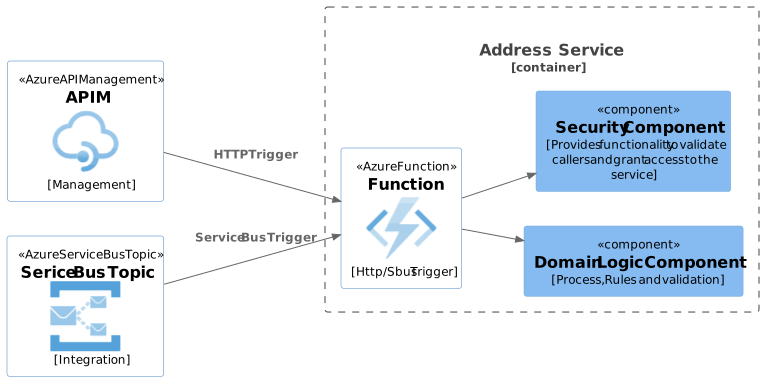
4.0.1.1 RESTFul API
Brochure
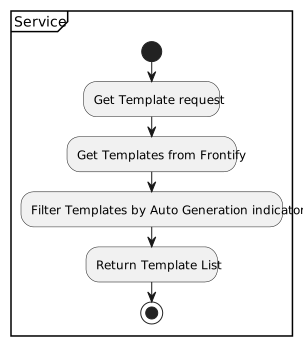
Get Templates
- Returns a list of templates
- Flow
URL : /Templates
Parameters : None
HTTP Method : GET
Request Body : None
Response Body
HTTP Errors
Error Meaning 2xx OK(Success) 4xx User Failure 5xx System Failure Response Body
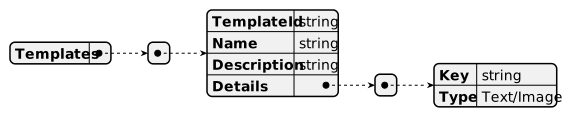
N.B. The Details array forms the Details array of the brochure request.
Complete Brochure
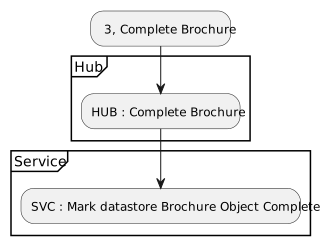
| URL | /CompleteBrochure | |
| Parameters | ||
| ExternalId | Id of the calling system | |
| HTTP Method | GET | |
| Request Body | None | |
| Response Body | None | |
| HTTP Errors | 2xx | OK(Success) |
| 4xx | User Failure | |
| 5xx | System Failure |
Audit
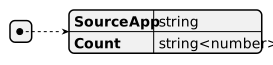
Get By Source App
- Returns the count of requests made by source Application
- URL /SourceApp/
- HTTP Method GET
- Parameters
- None - returns an list of source apps and there counts
- SourceApp - returns the count made by the passed SourceApp
- Request Body None
- Response Body
HTTP Errors
Error Meaning 2xx OK(Success) 4xx User Failure 5xx System Failure
Get By User
- Returns the count of requests made by User
- URL /User/ param / (optional) Detail
- HTTP Method GET
- Parameters
- None - returns an list of User and their counts
- Cannot add detail
- Id** - returns the count made by the passed User
- Login - returns the count made by the passed User
- Email - returns the count made by the passed User
- None - returns an list of User and their counts
- Request Body None
- Response Body
- Count Response
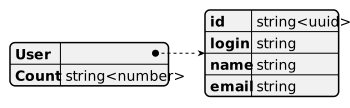
- Detail response
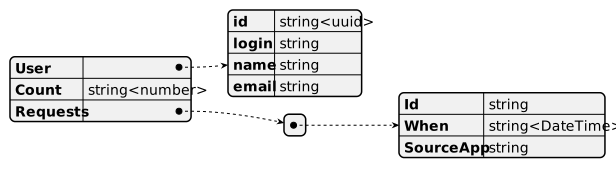
HTTP Errors
Error Meaning 2xx OK(Success) 4xx User Failure 5xx System Failure
Get By Impersonating
- Returns the count of requests made by Impersonating
- URL /Impersonating/ param / (optional) Detail
- HTTP Method GET
- Parameters
- None - returns an list of Impersonating and their counts
- Cannot add detail
- Id - returns the count made by the passed Impersonating
- Login - returns the count made by the passed Impersonating
- Email - returns the count made by the passed Impersonating
- None - returns an list of Impersonating and their counts
- Request Body None
- Response Body
- Count Response
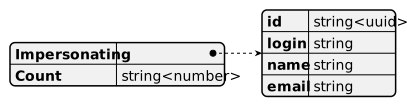
- Detail response
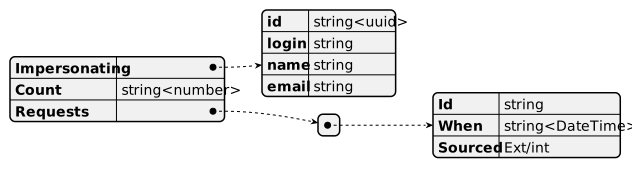
HTTP Errors
Error Meaning 2xx OK(Success) 4xx User Failure 5xx System Failure
Get By Host
Returns the count of requests made by Host
URL /Host/ param / (optional) Detail
HTTP Method GET
Parameters
Parameter Description Detail None Returns an list of Host and their count IpAddress Returns the count made by the passed Host Optional hostName Returns the count made by the passed Host Optional Request Body None
Errors
Http Status Code Meaning 200(OK) Success 4xx User request error 5xx System Error Response Body
Path Type Description Host.IpAddress string<ipAddress> The Ip Address of the requesting host Host.hostName string The name of the requesting host Count string<number> The total number of requests made Requests Array Requests[].Id string<uuid> Id of the request Requests[].When string<DateTime> When the request was made Requests[].Sourced string Ext/Int, was it a external or internal request - Count Response

* Detail response
4.0.1.2 Service Bus
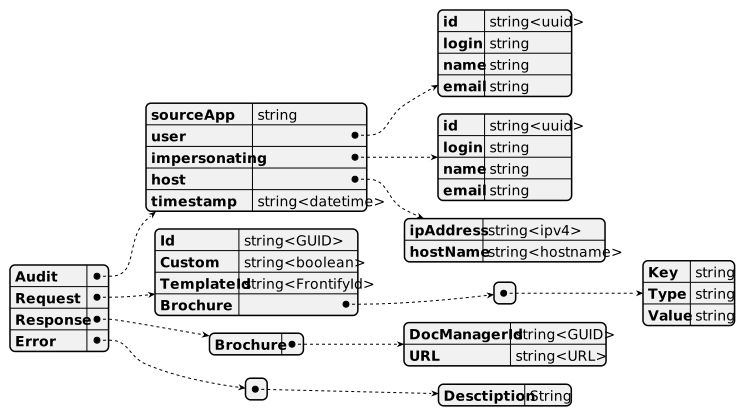
Request
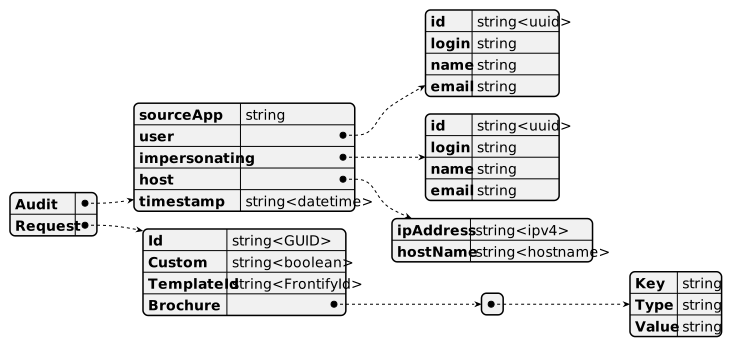
| Column | M/O | Type | Description |
|---|---|---|---|
| Id | M | Guid | Unique identifier |
| Custom | M | Boolean | Generate a custom brochure (manual) |
| TemplateId | O | string | Id of the template stored in the Frontify system |
| Brochure | M | Array of Key/Value pairs which make up the body of the brochure. | |
| - If the Type is TEXT then value is normal text | |||
| - If the Type is IMAGE then value is could be :- | |||
| - GUID then get the image from the DM | |||
| - Base64 string, it is the image | |||
| - path then get the image from the OG hub storage (maybe) | |||
| Audit | M | Common Audit information supplied to all services |
Response