9 Runtime View
9.1 Overview
This shows the general flow of how the system will function.
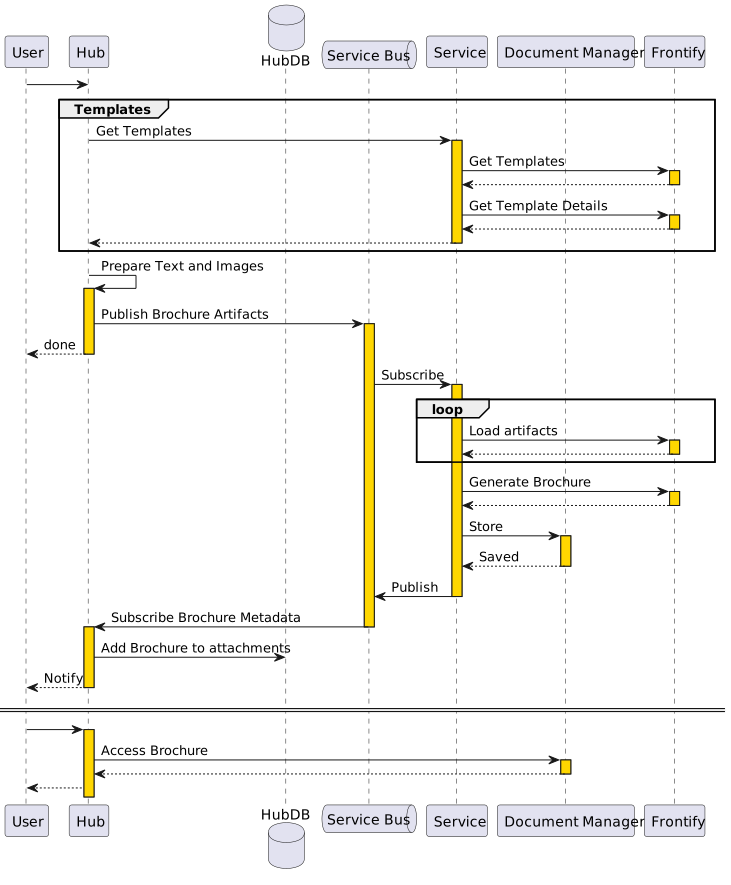
- The selects if they want to generate a Bespoke or a Auto Generated brochure.
- The service will make a Get Template request to Frontify, and filter the list to only those templates that are either the CSV or the Auto Generation brochure types.
- The Get Templates method will return the template name and its detail.
- Hub will create a service request object, and map the text and image artifacts to the template detail Keys.
- Hub publishes the Brochure Generation request to the service bus.
- The service picks up the brochure generation request, and creates a brochure object in the datastore.
- If the User requested a Bespoke brochure then
- A CSV file is created.
- All of the image objects from the existing request brochure object are loaded into frontify and Assets are created.
- The Text and Asset Id’s are written to the CSV.
- A request is made to the datastore to return all incomplete brochure objects.
- CSV rows are created for each.
- The CSV is uploaded.
- Once the Brochure has been created by the Frontify User, They will need to login to Hub and Upload the brochure, and indicate the generation is complete.
- Hub will inform the service that the brochure is complete.
- The service will complete the message in the datastore, stopping its inclusion in future CSV files.
- If the User requested a Auto Generation Brochure then
- A Export Creative request is generated
- Either Poll Or Wait for a Webhook, which will indicate the generation is complete.
- Save the brochure in the Document Manager.
- Create a response message, and publish it onto the service bus.