7 Security Component
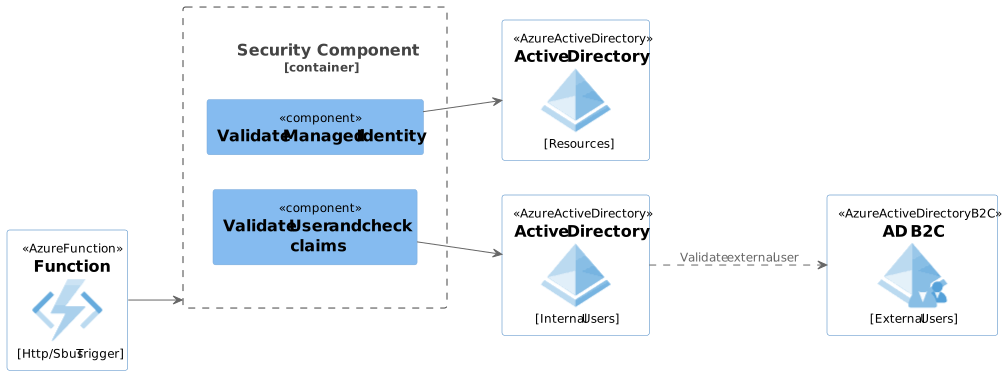
7.1 Managed Identity
The Header of any incoming message will contain 2 header keys IDENTITY_ENDPOINT and IDENTITY_HEADER they sometimes appear under there alias names MSI_ENDPOINT and MSI_HEADER.
7.1.1 Retrieve the MI token
Use the DefaultAzureCredential to obtain the token for the managed identity.
var credential = new DefaultAzureCredential();
var token = await credential.GetTokenAsync(new TokenRequestContext(new[] { "https://management.azure.com/.default" }));
7.1.2 Validate the token
Use the Microsoft.IdentityModel.Tokens library to validate the token. This involves checking the token’s signature, issuer, audience, and expiration.
using Microsoft.IdentityModel.Tokens;
using System.IdentityModel.Tokens.Jwt;

public bool ValidateToken(string token)
{
    var tokenHandler = new JwtSecurityTokenHandler();
    var validationParameters = new TokenValidationParameters
    {
        ValidateIssuer = true,
        ValidIssuer = "https://sts.windows.net/{tenant-id}/",
        ValidateAudience = true,
        ValidAudience = "https://management.azure.com/",
        ValidateLifetime = true,
        IssuerSigningKeyResolver = (token, securityToken, kid, parameters) =>
        {
            // Retrieve signing keys from Azure AD
            var discoveryDocument = "https://login.microsoftonline.com/{tenant-id}/v2.0/.well-known/openid-configuration";
            var keys = new JsonWebKeySet(discoveryDocument).GetSigningKeys();
            return keys;
        }
    };

    try
    {
        tokenHandler.ValidateToken(token, validationParameters, out SecurityToken validatedToken);
        return true;
    }
    catch
    {
        return false;
    }
}7.1.4 Function Code
By combining the above snippets, you would be able to check and authorise the calling application.
public static async Task<IActionResult> Run(HttpRequest req, ILogger log)
{
    var token = req.Headers["Authorization"].ToString().Replace("Bearer ", "");
    if (!ValidateToken(token))
    {
        return new UnauthorizedResult();
    }

    // Proceed with your function logic
    return new OkResult();
}
7.2 User Authentication
N.B. If a User token is included in the header then check the user is authorised.
Use the Microsoft.Identity.Web library to handle authentication and authorization in your function.
using Microsoft.AspNetCore.Mvc;
using Microsoft.Azure.WebJobs;
using Microsoft.Azure.WebJobs.Extensions.Http;
using Microsoft.AspNetCore.Http;
using Microsoft.Extensions.Logging;
using Microsoft.Identity.Web;
using System.Threading.Tasks;

public static class MyFunction
{
    [FunctionName("MyFunction")]
    public static async Task<IActionResult> Run(
        [HttpTrigger(AuthorizationLevel.Function, "get", "post", Route = null)] HttpRequest req,
        ILogger log)
    {
        var user = req.HttpContext.User;

        if (!user.Identity.IsAuthenticated)
        {
            return new UnauthorizedResult();
        }

        // Check for specific roles or claims
        if (!user.IsInRole("YourRequiredRole"))
        {
            return new ForbidResult();
        }

        // Proceed with your function logic
        return new OkObjectResult("User is authorized");
    }
}