API Audit Get Impersonating User
Calls that will illicit this response.
GET
/audit/impersonating/{option}/{variable}
(Returns the count of requests made by a impersonating user)
#### Description
The request returns a list of users and number of requests that user has made.
If no user details are passed then the request will return a list of all users and their request counts, but will not return the detail.
If either the User Id/Login Name or Email Address is passed then the details for that user will be returned.
#### Parameters
> | name | type | data type | description |
> |---|---|---|---|
> | One Of |||
> | ||||
> | `ID` | optional | string | Application Name |
> | `User Id` | optional | string | User Id |
> | ||||
> | `Login` | optional | string | Application Name |
> | `Login Name` | optional | string | Login Name |
> | ||||
> | `Email` | optional | string | Application Name |
> | `User Email Address` | optional | string | Application Name |
#### Responses
> | http code | content-type | response ||
> |---|--- |---|---|
> | `200`| `application/json` | `See Below` | |
> | `400`| `application/json` | `{"code":"400","message":"Bad Request"}` | The requested data does not exist |
> | `404`| `application/json` | `{"code":"404","message":"Not Found"}` | The request was understood, but no data was found|
#### Example cURL
> curl -X GET -H "Content-Type: application/json" http://localhost:8889/audit/impersonating/login/newportg
Response
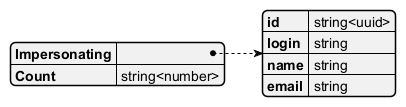
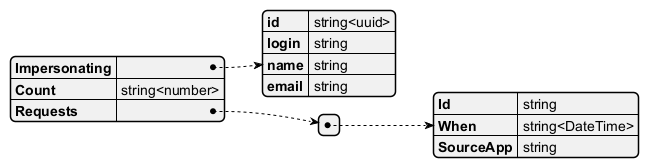
Field Descriptions
Example JSON Object
{
    "Impersonating": {
        "id" : "string<uuid>",
        "login": "string",
        "name": "string",
        "email": "string"
    },
    "Count": "string<number>"
}
{
    "Impersonating": {
        "id" : "string<uuid>",
        "login": "string",
        "name": "string",
        "email": "string"
    },
    "Count": "string<number>",
    "Requests" : [
        {
            "Id": "string",
            "When" : "string<DateTime>",
            "SourceApp": "string"
        }
    ]
}
JSON Schema
{
  "$schema": "http://json-schema.org/draft/2020-12/schema",
  "$id": "https://knightfrank.com/act/impersonatingres.schema.json",
  "title": "Get Impersonating response",
  "description": "Response from the internal ACT system",
  "type": "object",
  "properties": {
    "Impersonating": {
      "type": "object",
      "properties": {
        "id": {
          "type": "string",
          "format": "UUID"
        },
        "login": {
          "type": "string"
        },
        "name": {
          "type": "string"
        },
        "email": {
          "type": "string",
          "format": "email"
        }
      },
      "required": [
        "id",
        "login",
        "name",
        "email"
      ]
    },
    "Count": {
      "type": "number"
    },
    "Requests": {
      "type": "array",
      "items": [
        {
          "type": "object",
          "properties": {
            "Id": {
              "type": "string",
              "format": "UUID"
            },
            "When": {
              "type": "string",
              "format": "datetime"
            },
            "SourceApp": {
              "type": "string"
            }
          },
          "required": [
            "Id",
            "When",
            "SourceApp"
          ]
        }
      ]
    }
  },
  "required": [
    "Impersonating",
    "Count"
  ]
}
JSON validated against schema
{
    "Impersonating": {
        "id" : "3e4666bf-d5e5-4aa7-b8ce-cefe41c7568a",
        "login": "frogf",
        "name": "Freddo Frog",
        "email": "freddofrog@knightfrank.com"
    },
    "Count": 50,
    "Requests": [
      {
        "Id": "3e4666bf-d5e5-4aa7-b8ce-cefe41c7568a",
        "When": "2025-01-01 12:05:05",
        "SourceApp": "hub"
      }
    ]
}