Nimbus Service Handler
To interface with the Nimbus Document Purchase API, here is the CARE framework specification tailored for your requirement to retrieve title availability and handle document downloads via webhooks.
Contact
nic.neate@nimbusproperty.co.uk
URL
https://api-preprod.nimbusmaps.xyz/docs/v1
Nimbus API's
Context (The Operational Environment)
The application operates as an automated document procurement agent. It must manage OAuth 2.0 state (tokens expire every hour) and maintain a listener for asynchronous webhook payloads. It interacts with the https://api.nimbusmaps.co.uk/docs/v1 and https://api.nimbusmaps.co.uk/search production server and requires a persistent storage layer to map order_id values to specific title requests.
Action (The Technical Workflow)
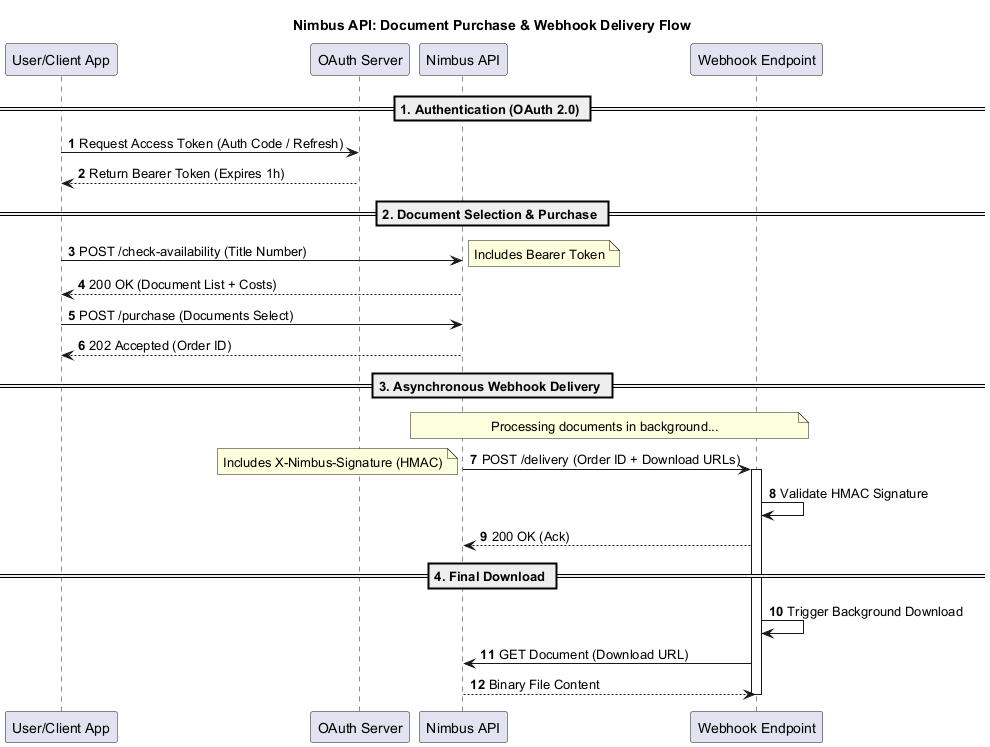
- Authentication: Perform the OAuth 2.0 Flow to obtain a Bearer token.
- Availability Check:
- If Address Supplied.
- Use the Search API /address to get the Title No.
- N.B. Could return multiple title No.
- If Title No. Supplied or obtained thru search request.
- Send a POST request to /check-availability with the title_number (e.g., AB123456).
- Validation: Inspect the title_status_code and token_cost. If VALID and the current_balance is sufficient, proceed.
- Purchase: Submit a POST to the /purchase endpoint specifying the type_code (e.g., REGISTER, TITLEPLAN).
- Webhook Ingestion: Wait for the third-party service to POST a JSON payload to our exposed endpoint containing the secure download URLs for the requested documents.
Rules (Constraints & Error Handling)
- Rate Management: Adhere to the limit of 60 requests per minute. Implement an exponential backoff if a 429 Too Many Requests error occurs.
- Security: The webhook endpoint must validate the source (e.g., via a secret header or IP allowlisting) to ensure document links are legitimate.
- Freshness: Data is cached in Azure API Management for 5 minutes; redundant availability checks within this window will return cached results.
- Concurrency: Handle the PENDING_APPLICATIONS status by logging a warning to the user, as the documents may not represent the final state of the title.
Execution (Interaction Specification)
- Step 1: Reformat the address as a single line, get title no. and then /check-availability.
- Step 2: Parse the AvailabilityCheckResponse. If availability_code is IMMEDIATE, trigger the purchase.
- Step 3: Your listener service must parse the webhook's data.order_id and iterate through the provided document array to execute the final file download (e.g., using a stream to save to S3 or local storage).
Sequence Diagram